


Visão geral
O sistema inteligente de controlo de risco da Gate oferece aos gestores de ativos capacidades abrangentes de gestão de risco. Ao monitorizar indicadores-chave em tempo real (tais como o volume do fundo, o valor líquido dos ativos (VPL), a queda de valor, a exposição das posições e a alavancagem) e combiná-los com regras flexíveis baseadas em limites, o sistema permite a emissão de alertas de risco e intervenções automatizadas para garantir um funcionamento seguro e em conformidade com as normas.
A criação de um quadro sólido de controlo de riscos não é apenas um requisito para a distribuição de produtos, mas também uma forma eficaz de proteger os interesses dos investidores. Um mecanismo sistemático de gestão de riscos pode minimizar os riscos de investimento, reforçar a confiança dos investidores e proporcionar um forte apoio ao sucesso da distribuição dos produtos.
Este artigo apresenta uma introdução detalhada às principais funções e métodos de configuração da monitorização do risco de mercado.
Definição de monitorização de riscos
A monitorização de riscos refere-se ao processo de acompanhamento em tempo real, análise quantitativa e gestão proativa dos diversos riscos de mercado encontrados durante a operação de investimento de produtos de gestão de ativos.
Os gestores de fundos e de ativos monitorizam continuamente 11 indicadores-chave, 24 horas por dia, 7 dias por semana, através de regras e limites de controlo de risco predefinidos, incluindo a dimensão do fundo, VPL, redução, a exposição e a alavancagem. Quando uma métrica satisfaz as condições de acionamento predefinidas, o sistema notifica imediatamente o gestor e aplica automaticamente medidas de restrição de acordo com a estratégia de controlo de riscos, mitigando eficazmente os riscos potenciais.
Métricas de risco
O sistema permite a monitorização em tempo real e a configuração de regras para as seguintes 11 métricas principais:
Dimensão do fundo (moeda de base): VPL do produto denominado na moeda de liquidação.
Dimensão do fundo (USDT): VPL do produto denominado em USDT.
Partilha: Número total de unidades do produto.
VPL por unidade: Valor líquido dos ativos por unidade.
Redução do VPL nas últimas 24 horas: redução máxima do VPL por unidade nas últimas 24 horas.
Valor da exposição: exposição ao risco ponderada por direção, incluindo alavancagem.
Relação de exposição: relação entre a exposição da posição e o VPL do produto.
Valor total da posição: valor nocional total de todas as posições, independentemente da direção.
Relação de alavancagem: múltiplo de alavancagem efetivamente utilizado pelo produto.
Valor da posição de tokens menores: valor total das participações em tokens de pequena capitalização com baixa liquidez.
Relação de posições de tokens menores: relação entre as participações em títulos de menor capitalização e o VLP do produto.
Guia de configuração das regras de controlo de risco
Etapas de configuração
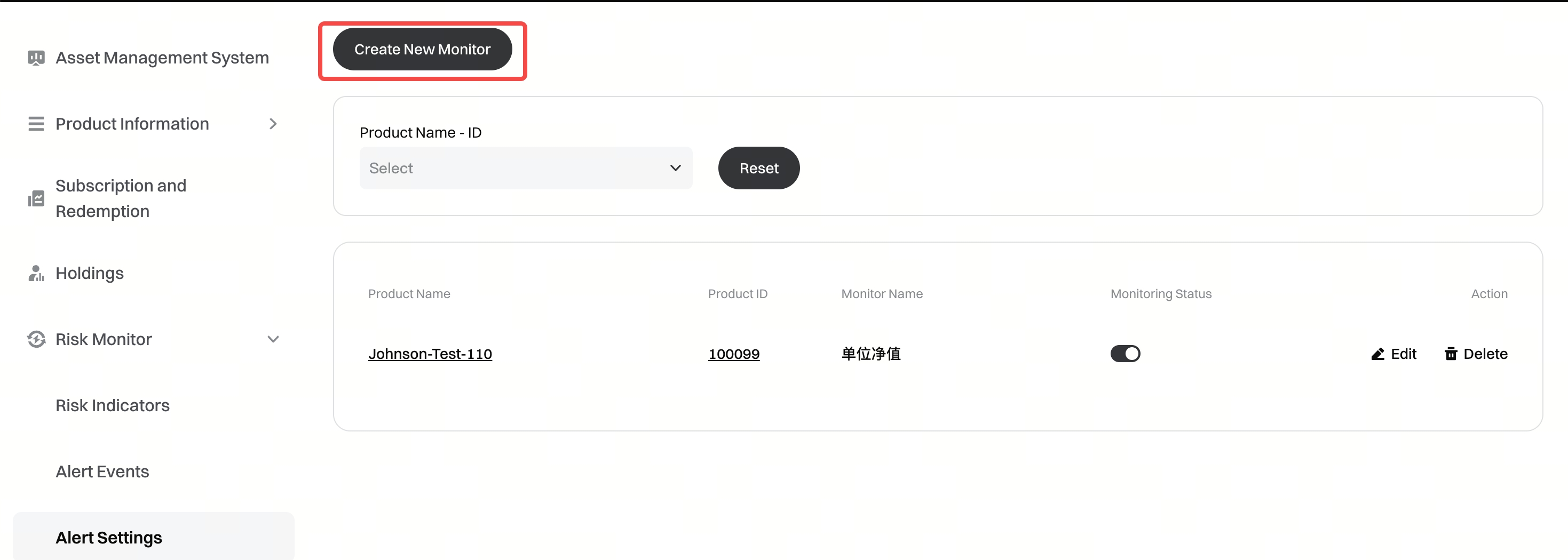
Etapa 1:
Aceda ao [Monitor de risco] - [Definições de Alerta] e, em seguida, clique em [Criar novo monitor].
Etapa 2:
Selecione o produto para o qual pretende configurar a monitorização.

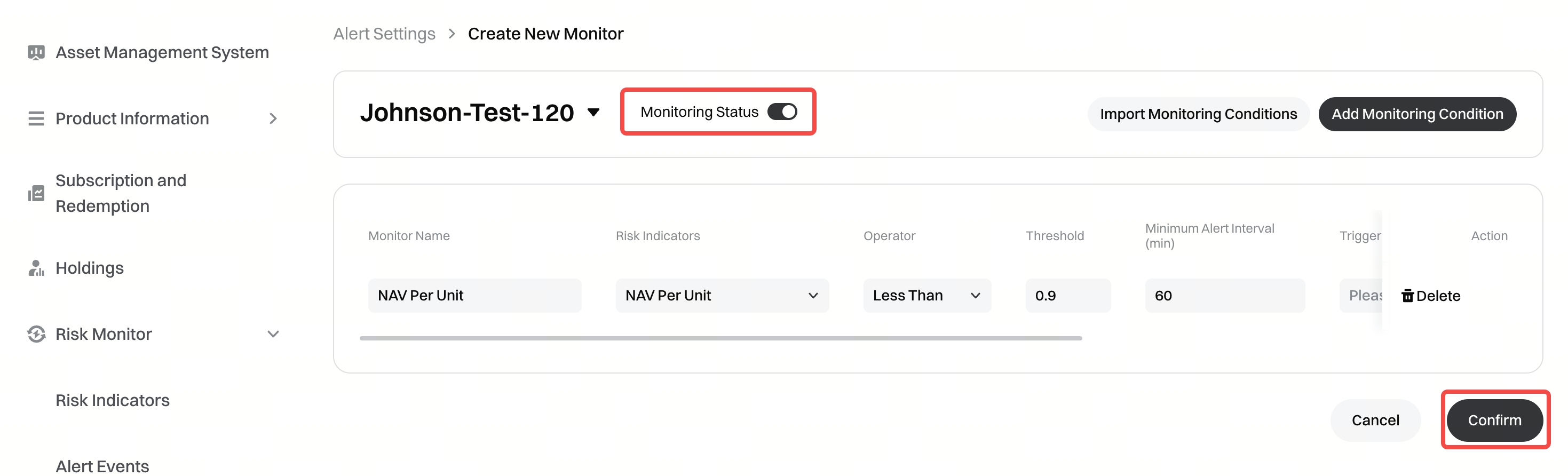
Etapa 3:
Ative a monitorização, configure as regras de monitorização e confirme as definições. É possível selecionar canais de notificação como o Telegram.
Criar um bot do Telegram
Como os gestores configuram um bot do Telegram
Como gestor, deve primeiro criar o seu próprio bot do Telegram, obter o token da API e o ID do chat e, em seguida, configurá-los no sistema de gestão de ativos Gate.
Etapa 1: Criar um bot do Telegram
- Encontre e inicie o @BotFather
Procure por @BotFather no Telegram (procure a conta verificada com uma marca de verificação azul) e, em seguida, toque em "Iniciar" para dar início à conversa.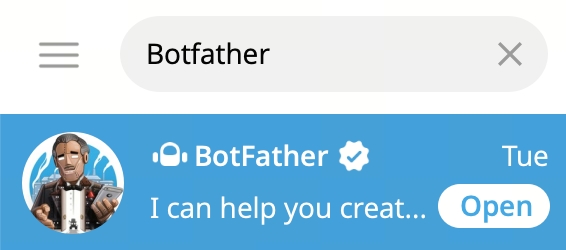
- Crie um novo bot
Digite ou toque no comando /newbot no chat:
- Nome: introduza o nome de exibição do seu bot (por exemplo, Alertas de controlo de risco da Gate);
- Nome de utilizador: introduza um nome de utilizador único. Deve terminar em "bot" (por exemplo, GateRiskControl_bot) e não pode coincidir com nenhum nome de utilizador já existente.
- Obtenha o token da API
Após a criação bem-sucedida, o BotFather enviar-lhe-á uma mensagem com o token da API HTTP. O formato é semelhante a: 123456789: ABCdefGHIjklMNOpqrsTUVwxyz
Etapa 2: Obter o ID do chat
- Obtenha o ID do chat: insira o seu token da API na seguinte URL, substituindo {token}: https://api.telegram.org/bot{token}/getUpdates
Abra o link no seu navegador e localize o ID do chat na resposta.
Etapa 3: Configurar no Sistema de Gestão de Ativos Gate
- Aceda à página [Criar novo monitor] e selecione o Telegram como canal de notificação.
- Introduza as seguintes informações:
- Token: cole o token da API obtido no @BotFather;
- ID do chat: cole a ID do chat obtido.
Impacto das ações de acionamento
Apenas notificação
Será enviada uma notificação através dos canais de notificação configurados.
Proibido negociar
É acionada uma notificação e todas as autorizações de negociação relativas ao produto são restringidas.
Proibido comprar e abrir posições
É acionada uma notificação.
No Modo de margem de múltiplas moedas, só são permitidos reembolsos.
Na negociação à vista, só é permitido comprar a moeda base ou USDT.
Apenas são permitidas transações de venda para encerramento na negociação com margem cruzada.
Na negociação de futuros, só são permitidas transações de venda para encerramento.
Como remover restrições
Método 1: Remoção automática
Quando os indicadores de risco baixarem e deixarem de cumprir as condições de ativação, o sistema removerá automaticamente as restrições.
Método 2: Remoção manual
O gestor pode visualizar e remover restrições ativas em [Eventos de Alerta].
Perguntas frequentes
1. Como é que as permissões de negociação podem ser rapidamente restabelecidas após o acionamento de uma restrição de controlo de risco?
- Reduzir a exposição: encerre ativamente as posições para diminuir a alavancagem. As restrições serão automaticamente levantadas assim que os indicadores regressarem a níveis seguros.
- Adicionar margem: deposite fundos para aumentar o VPL, reduzindo assim a alavancagem e a redução.
- Solicitar remoção manual: solicite a remoção manual em [Eventos de alerta].
- Aguardar a remoção automática: se as condições do mercado melhorarem e os indicadores recuperarem, o sistema levantará automaticamente as restrições.
2. Como evitar falsos alertas que levam à imposição de restrições de controlo de risco?
- Definir limites razoáveis: configure com base em dados históricos e nas características da estratégia para evitar definições excessivamente restritivas.
- Utilize regras por escalão: defina tanto regras de aviso (apenas notificação) como regras de restrição (aplicação efetiva).
- Ativar notificações do Telegram: responda aos alertas a tempo e ajuste as posições antes que as restrições sejam acionadas.
- Analisar os registos regularmente: analise as causas dos falsos alarmes e otimize as definições dos limiares.
- Avaliar antes de negociações de grande volume: avalie o impacto nas métricas de risco antes de abrir posições de grande volume.
3. É possível configurar várias regras de controlo de risco ao mesmo tempo?
Sim. É possível definir várias regras de controlo de risco para o mesmo produto, a fim de monitorizar diferentes métricas. Quando uma regra for acionada, a ação de restrição correspondente será executada.
Isenção de responsabilidade
O conteúdo aqui disponibilizado destina-se apenas a fins de referência e educativos, não constituindo qualquer aconselhamento financeiro, de investimento, de negociação ou jurídico, nem representa uma oferta ou solicitação para comprar ou vender quaisquer ativos digitais. A Gate não assume quaisquer declarações ou garantias, expressas ou implícitas, quanto à exatidão, integridade ou atualidade das informações aqui contidas. As funcionalidades dos produtos, interfaces, regras e estruturas de comissões podem ser atualizadas ou ajustadas a qualquer momento. Consulte os anúncios mais recentes e a informação efetivamente apresentada na plataforma Gate para obter os dados mais precisos.
Os investimentos em ativos digitais envolvem riscos significativos, podendo os preços variar substancialmente. Existe a possibilidade de perder a totalidade do montante investido. Tome decisões de forma cautelosa, tendo em conta a sua situação financeira e tolerância ao risco, após compreender plenamente os riscos associados. Se necessário, recomenda-se consultar um consultor financeiro ou jurídico independente.
Para mais informações sobre potenciais riscos, consulte a Divulgação de Riscos e o Acordo de Utilizador da Gate.
